
Vocal Pitch Monitor
See exactly what you sing.
Sing or play into your mic and watch your pitch trace across a note grid, live. Free, in your browser, nothing to install.
Transpose · C ▾
Show notes as for an instrument in
 Expand toolOpen workspace
Ready for your first note.
Press Start, allow your microphone, then sing or play a single note.
 Start
StartYour audio stays on this device. The browser asks for the mic only when you press Start.
SETTINGS
In the iOS & Android app
- Pitch line
- Smooth curve

- View
- Full piano roll, scroll and zoom
- Look
- Grid lines or piano roll
IN THE iOS & ANDROID APP
What the app adds
- Steadier pitch detection
- A more robust pitch-detection algorithm draws a smooth, continuous curve that ignores noise and stray readings. Fast slides fade out, so the melody reads at a glance.
- Full piano roll
- Every octave on screen, centered on your voice as you sing. Scroll and zoom whenever you like.
- Your choice of look
- Grid lines, or a piano-roll background.
- A library of takes
- Save takes, keep them together, and share them with friends who have the app, through any messaging app.
- Better MIDI export
- Cleaner splitting into separate notes.
- Longer videos
- Up to 5 minutes.
The apps are free to download, with an optional yearly subscription.


MIC HELP
If the mic is blocked, click the lock or microphone icon in your browser's address bar, allow the microphone for this site, then reload the page and press Start.
Nothing happens when you play? Check that the right input is selected in your system's sound settings.
Read the line
What the pitch line shows you
A tuner tells you about one instant. Pitch Diagram is a real-time pitch graph of the whole phrase.
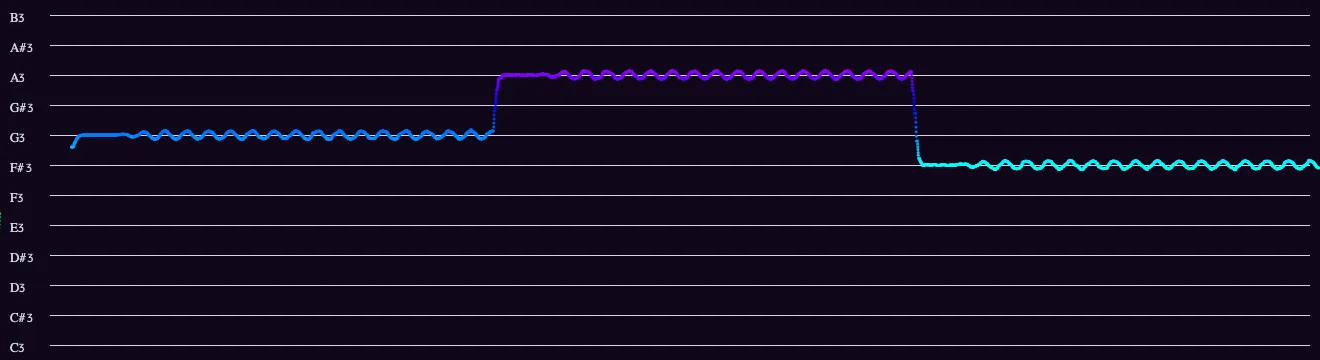
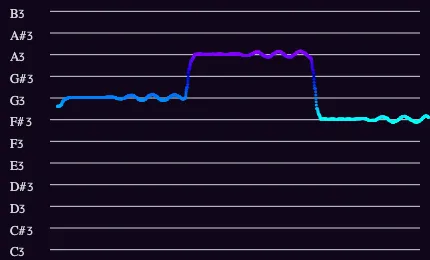
The note you’re on.
The line runs along the row of the note you’re singing. Note names and the octave are on the left, so a held note can be read straight off the grid.
What you can’t hear yourself.
Your voice reaches your ears through your own skull, and your brain quietly corrects the difference. The graph doesn’t.
The raw reading, not a calm needle.
Most pitch readers smooth the frequency until it looks steady. This draws the raw detection 60 times a second, so the scoop into a note and the vibrato stay visible.
In the iOS & Android app
Even better in the app
- Steadier pitch detection
- A more robust pitch-detection algorithm draws a smooth, continuous curve that ignores noise and stray readings. Fast slides fade out, so the melody reads at a glance.
- On the web: separate dots, every raw reading
- Full piano roll
- Every octave on screen, centered on your voice as you sing. Scroll and zoom whenever you like.
- On the web: one octave, note names wrap
- Your choice of look
- Grid lines, or a piano-roll background.
- On the web: grid lines
- A library of takes
- Save takes, keep them together, and share them with friends who have the app, through any messaging app.
- On the web: video and MIDI downloads
- Better MIDI export
- Cleaner splitting into separate notes.
- On the web: basic
- Longer videos
- Up to 5 minutes.
- On the web: up to 60 seconds
The apps are free to download, with an optional yearly subscription.
One tool, many uses
What you can do with it
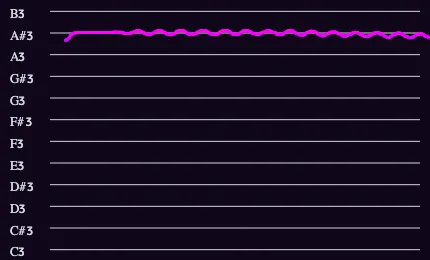
EXAMPLE Check your intonation.
Hold a note or sing a phrase and see exactly where it drifts, scoops or wobbles.
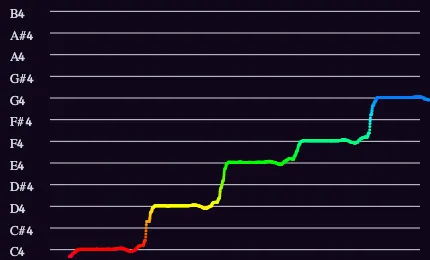
EXAMPLE Find the notes of a melody.
Sing the tune in your head and read the notes off the grid, or record MIDI and drop it into your DAW. A quick way to transcribe what you can only hum.
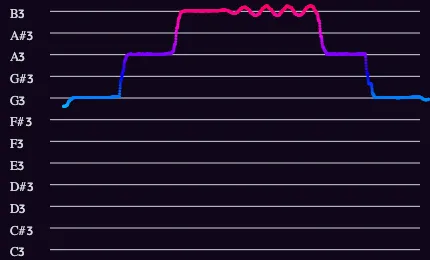
EXAMPLE Test your ear.
Play a note, sing it back and see how close you landed, or check a transcription note by note.
Good to know
Questions
- What note am I singing?
- Press Start and sing. The line appears on the row of the note you’re singing, with the note name and octave on the left. If the line sits between two rows, you’re between two notes.
- Does it work with instruments?
- Yes, with any instrument that plays one note at a time: violin, cello, flute, trumpet, saxophone, a guitar melody. For chords, use the Pitch Spectrogram.
- How is this different from a tuner?
- A tuner shows where you are right now. Pitch Diagram keeps the last few seconds on screen, so you see how each note started, held and ended. It works as a pitch tracker and visualizer for singing practice. To tune a string, the Tuner is quicker.
- Is my audio uploaded?
- No. The pitch is worked out in your browser. Nothing you sing or play is sent anywhere or stored.
- Does it work on my phone?
- Yes, in any up-to-date mobile browser. The iOS and Android apps add a smooth pitch curve, a full piano roll and a library of takes.
- Is it free?
- The web tools are free. The apps are free to download, with an optional yearly subscription.
One musical toolkit
10 tools for musicians.
Analyze what you play, make sound, train your ear. The app groups them the same way.
Analyze
 Pitch Diagram
Real-time pitch graph. See every note you sing or play.
 Tuner
TunerChromatic tuner with cents and a pitch history.
 Pitch Spectrogram
See every note in a chord at once.
 Intonation Tracker
How many cents each note lands off.
 Spectrum Analyzer
Every frequency from 10 Hz to 20 kHz.
Sound
 Tone Generator
A steady tone at any note or frequency.
 Metronome
A steady click, with your playing drawn against it.
 Keyboard
Sampled piano and harpsichord.
Learn
 Interval Training
Name scale degrees by ear.
 Solfege Trainer
Sing scale degrees in key. App only.